DLL Examples
These projects build a supporting wrapper around the IEEE/Cigre specification for dynamic link libraries (DLLs), and three examples. They should be built in the following order.
First, install the compiler and Cmake from Visual Studio (find Build Tools for Visual Studio 2022 under Tools for Visual Studio 2022). Python is also used for plotting test results.
All DLL builds are performed in the x64 Native Tools Command Prompt for VS 2022, which is on the Windows Start Menu.
Build the wrapper project, as the following four examples depend on it.
Build and test the SCRX9 example, which is a self-contained static exciter DLL from Electranix.
Build and test the GFM_GFL_IBR example, which is a self-contained inverter-based resource (IBR) controller from EPRI.
Build and test the GFM_GFL_IBR2 example, which is version 2 of a self-contained IBR controller from EPRI.
Build and test the HWPV example, which is a data-driven IBR model from PNNL and UCF. This example is not self-contained; you will have to download and build a JSON support library, and sample data-driven model files.
Build and test the PPC example, which is a renewable plant controlller model (WECC REPCA) compiled with OpenModelica (a required download for this example).
The build instructions will produce 64-bit and 32-bit versions of all example DLLs, test harnesses, and support libraries. A 32-bit simulator, such as ATP, will need the 32-bit DLLs.
These five examples can be built and tested in Python. To run the DLL examples in ATP, follow the linking instructions after compiling and linking the DLLs. An ATP license is required for access to these linking instructions.
SCRX9
This is an example DLL for the IEEE/Cigre specification, a static exciter model for synchronous machines. Developed by Electranix.
Build Instructions - Windows
Follow these instructions to make 64-bit and 32-bit versions of the DLL:
Open the x64 Native Tools Command Prompt for VS 2022 from Windows Start Menu
From the SCRX9 project directory (
rd /s buildandrd /s build32if they exist):md buildmd build32cmake -B build -A x64cmake -B build32 -A Win32cmake --build build --config Releaseorcmake --build build --config Debugcmake --install buildcmake --build build32 --config Release` or ``cmake --build build32 --config Debugcmake --install build32
From the SCRX9/build and SCRX9/build32 directories, check the exported functions with no wrapper:
dumpbin /exports release/SCRX9.dllordumpbin /exports debug/SCRX9.dllrelease/testgenerates an output CSV file in the ../../bin directoryFrom the ../bin directory, relative to SCRX9, check outputs with
python plotdlltest.py
From the ../bin and ../bin32 directories, check the DLL wrapper:
test_scrx9should give the same results asrelease/testaboveVerify with
python plotdlltest.pyfrom the ../bin and ../bin32 directories relative to SCRX9
File Directory
CMakeLists.txt generates the detailed build instructions
SCRX9.c is the (nearly) unmodified example file from Garth Irwin of Electranix
test.c is a test harness, mimicking the DLL import and calling functions of a simulation tool
test_scrx9.c is a test harness, invoking the DLL through an EMTHub wrapper that supports all IEEE/Cigre DLLs
Results
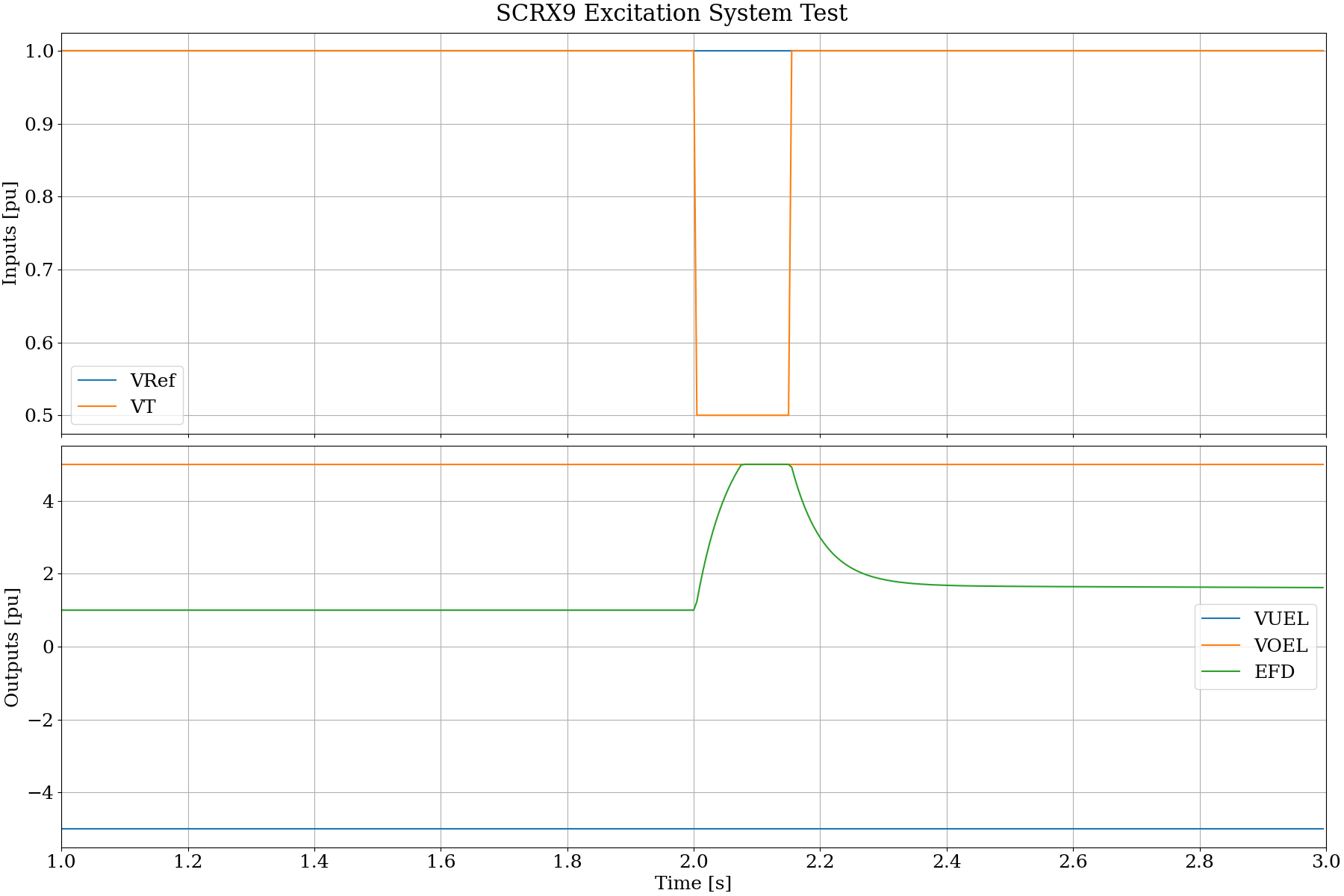
The following result shows a drop in terminal voltage at 2.0 s to 0.5 pu. The EFD output responds as limited by the overexcitation limiter value, VOEL.
Grid Impedance
This tests a single-machine, infinite-bus (SMIB) grid that an inverter model may be connected to. The grid consists of a three-phase voltage source with three-phase source impedance. Trapezoidal integration is used to solve for currents in the source impedance, given the voltages on each terminal of the impedance. One terminal voltage is defined by the SMIB voltage source. The other terminal voltage is defined by the connected DLL’s output.
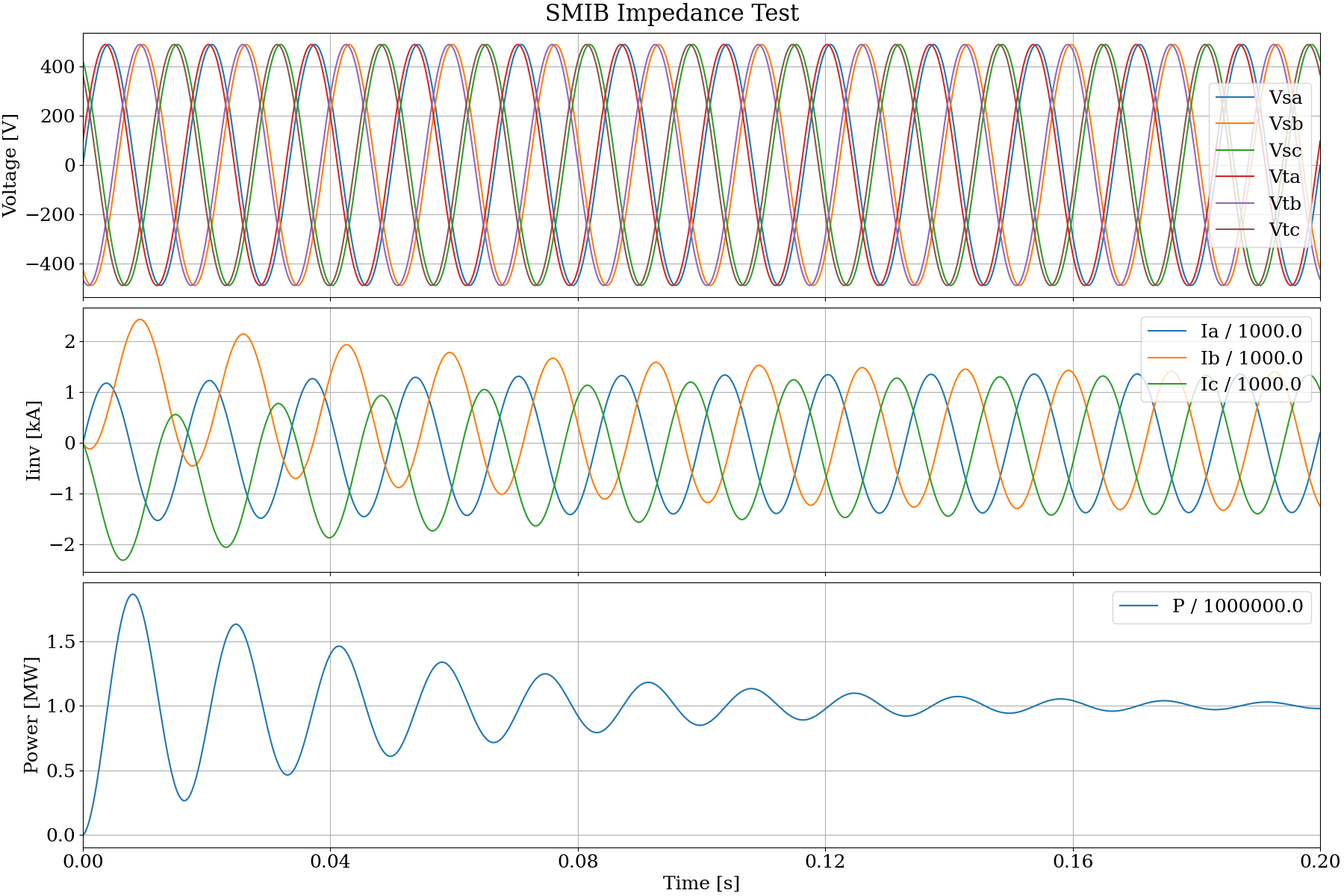
In this example, the DLL’s output voltage is mimiced in code. The purpose of this test is to verify proper execution of the trapezoidal integration at each time step. The output should show inductive currents all beginning at zero, then gradually assume the expected sinusoidal shapes, 120 degrees apart, with no DC offset in the current. The DLL controller action is not included. To do that, code from this example is incorporated into the ../gfm_gfl_ibr/test_ibr.c and ../gfm_gfl_ibr2/test_ibr2.c source files.
Build Instructions - Windows
Open the x64 Native Tools Command Prompt for VS 2022 from Windows Start Menu
From the grid project directory (
rd /s buildif it exists):md buildcmake -B build -A x64cmake --build build --config Releaseorcmake --build build --config Debugcmake --install build
From the ../bin directory, check the trapezoidal integration output:
test_gridshould produce an output grid.csv fileVerify with
python plotdlltest.py grid.csv
File Directory
CMakeLists.txt generates the detailed build instructions
test_grid.c implements trapezoidal integration for current in a three-phase source impedance
Results
The following result shows the voltages at each terminal and the currents through each phase of a 0.01 + j 0.20 per-unit grid impedance. The source voltage is 600 volts line-to-line and the base power is 1 MW. The phase angle between terminal voltages is 11.54 degrees, to create approximately 1 per-unit or 1 MW power flow. The inductive currents begin at zero, so there is a transient response as the DC offset decays and the power flow approaches 1 MW.
GFM GFL v1
This is an example DLL for the IEEE/Cigre specification, implementing grid-forming (GFL) and grid-following (GFL) behaviors for inverter-based resources (IBR). Developed by EPRI.
Build Instructions - Windows
Follow these instructions to make 64-bit and 32-bit versions of the DLL:
Open the x64 Native Tools Command Prompt for VS 2022 from Windows Start Menu
From the GFM_GFL_IBR project directory (
rd /s buildandrd /s build32if they exist):md buildmd build32cmake -B build -A x64cmake -B build32 -A Win32cmake --build build --config Releaseorcmake --build build --config Debugcmake --install buildcmake --build build32 --config Release` or ``cmake --build build32 --config Debugcmake --install build32
From the ../bin and ../bin32 directories, check the DLL wrapper:
test_ibrshould produce an output ibr.csv fileVerify with
python plotdlltest.py ibr.csv
File Directory
CMakeLists.txt generates the detailed build instructions
GFM_GFL_IBR.c is the unmodified example file from Deepak Ramasubramanian of EPRI
test_ibr.c is a test harness, mimicking the DLL import and calling functions of a simulation tool
Results
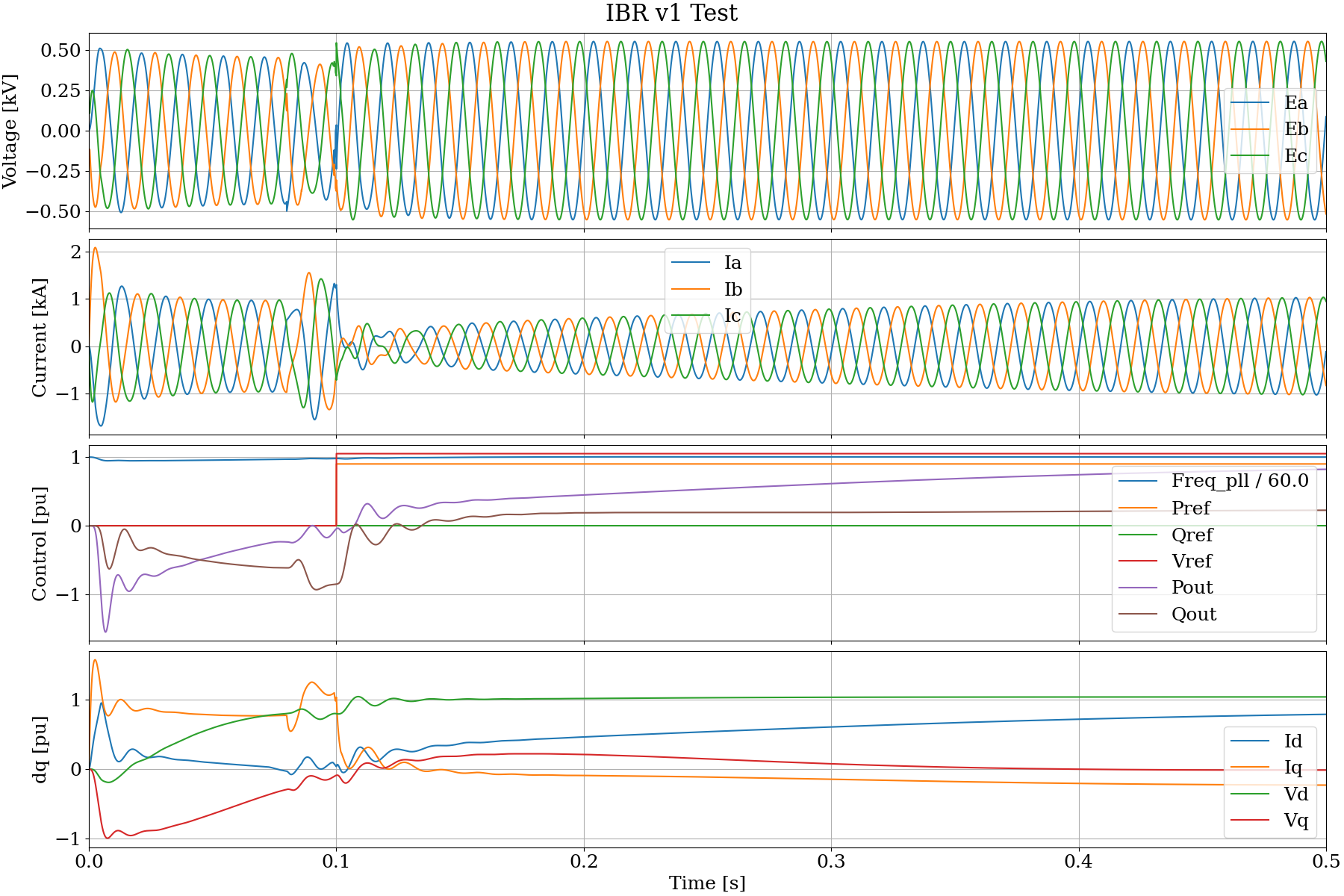
The base voltage is 0.65 kV and the base power is 1 MW. The SMIB impedance is 0.01 + j 0.2 pu. The AC output filter of the inverter is not implemented. At 0.1 s, the control requests 1.05 pu voltage and 0.9 pu power output. Qref is not changed but the reactive power output must be controlled to achieve the desired output value. The DLL controls the phase currents are controlled to nearly achieve these requests by 0.5 s, as seen in plotted values of Pout, Qout, and Vd.
GFM GFL v2
This is an example DLL for the IEEE/Cigre specification, implementing grid-forming (GFL) and grid-following (GFL) behaviors for inverter-based resources (IBR). See EPRI Report. This is a newer version of the EPRI-developed IBR model presented in ../gfm_gfl_ibr.
Build Instructions - Windows
Follow these instructions to make 64-bit and 32-bit versions of the DLL:
Open the x64 Native Tools Command Prompt for VS 2022 from Windows Start Menu
From the GFM_GFL_IBR2 project directory (
rd /s buildandrd /s build32if they exist):md buildmd build32cmake -B build -A x64cmake -B build32 -A Win32cmake --build build --config Releaseorcmake --build build --config Debugcmake --install buildcmake --build build32 --config Release` or ``cmake --build build32 --config Debugcmake --install build32
From the ../bin and ../bin32 directories, check the DLL wrapper:
test_ibr2should produce an output ibr2.csv fileVerify with
python plotdlltest.py ibr2.csv
File Directory
CMakeLists.txt generates the detailed build instructions
gfm_gfl_ibr2.c is the unmodified example file from Vishal Verma of EPRI, OCR-scanned from the report downloadable from https://www.epri.com/research/products/3002028322
test_ibr2.c is a test harness, mimicking the DLL import and calling functions of a simulation tool
Results
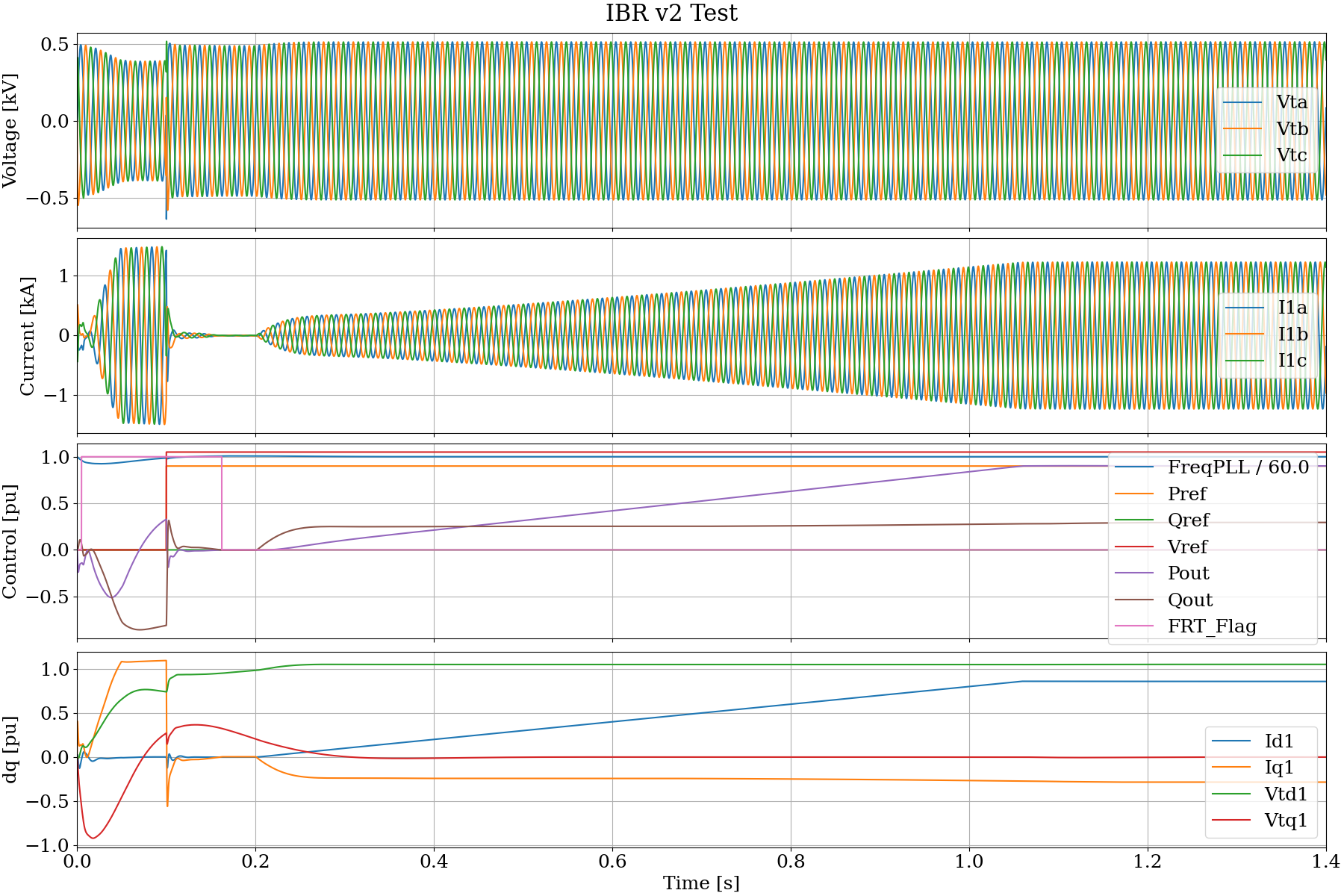
The base voltage is 600 V and the base power is 1 MW. The SMIB impedance is 0.01 + j 0.2 pu. The AC output filter of the inverter is not implemented. The nominal DC voltages is 1200 V, half that value is multiplied by the DLL output modulation indices to create average source voltages. At 0.1 s, the control requests 1.05 pu voltage and 0.9 pu power output. However, the internal DLL control is not released until 0.2 s. Qref is not changed but the reactive power output must be controlled to achieve the desired output value. The DLL controls the phase currents are controlled to achieve these requests by 1.4 s, as seen in plotted values of Pout, Qout, and Vtd1.
HWPV
This is an example DLL for the IEEE/Cigre specification, implementing generalized block diagram models for solar photovoltaic inverters. See pecblocks for more information.
Build Instructions - Windows
Follow these instructions to make 64-bit and 32-bit versions of the DLL:
Open the x64 Native Tools Command Prompt for VS 2022 from Windows Start Menu
Download and build the required JSON support library, into a sibling directory of EMTHub.
From the parent directory of EMTHub,
git clone https://github.com/akheron/jansson.gitcd janssonmd buildmd build32cmake -B build -A x64cmake -B build32 -A Win32cmake --build build --config Releasecmake --build build32 --config Releasecopy build\lib\release\jansson.lib ..\emthub\dll\libcopy build32\lib\release\jansson.lib ..\emthub\dll\lib32
Clone the _pecblocks_ repository, into a sibling directory of _EMTHub_, for some example models:
From the parent directory of EMTHub,
git clone https://github.com/pnnl/pecblocks.gitThe generalized block diagram models are located in various json files under the examples directory. Some of these must be run at reduced power output, until new versions are trained with sensitivity optimization, as described in pecblocks documentation
From this _hwpv_ project directory (
rd /s buildandrd /s build32if they exist):md buildmd build32cmake -B build -A x64cmake -B build32 -A Win32cmake --build build --config Releaseorcmake --build build --config Debugcmake --install buildcmake --build build32 --config Releaseorcmake --build build32 --config Debugcmake --install build32
From the ../bin and ../bin32 directories, check the DLL wrapper:
test_hwpvshould produce an output hwpv.csv fileVerify with
python plotdlltest.py hwpv.csv
File Directory
CMakeLists.txt generates the detailed build instructions
hwpv.c implements forward evaluation of the trained generalized block diagram model
test_hwpv.c is a test harness, mimicking the DLL import and calling functions of a simulation tool
Results
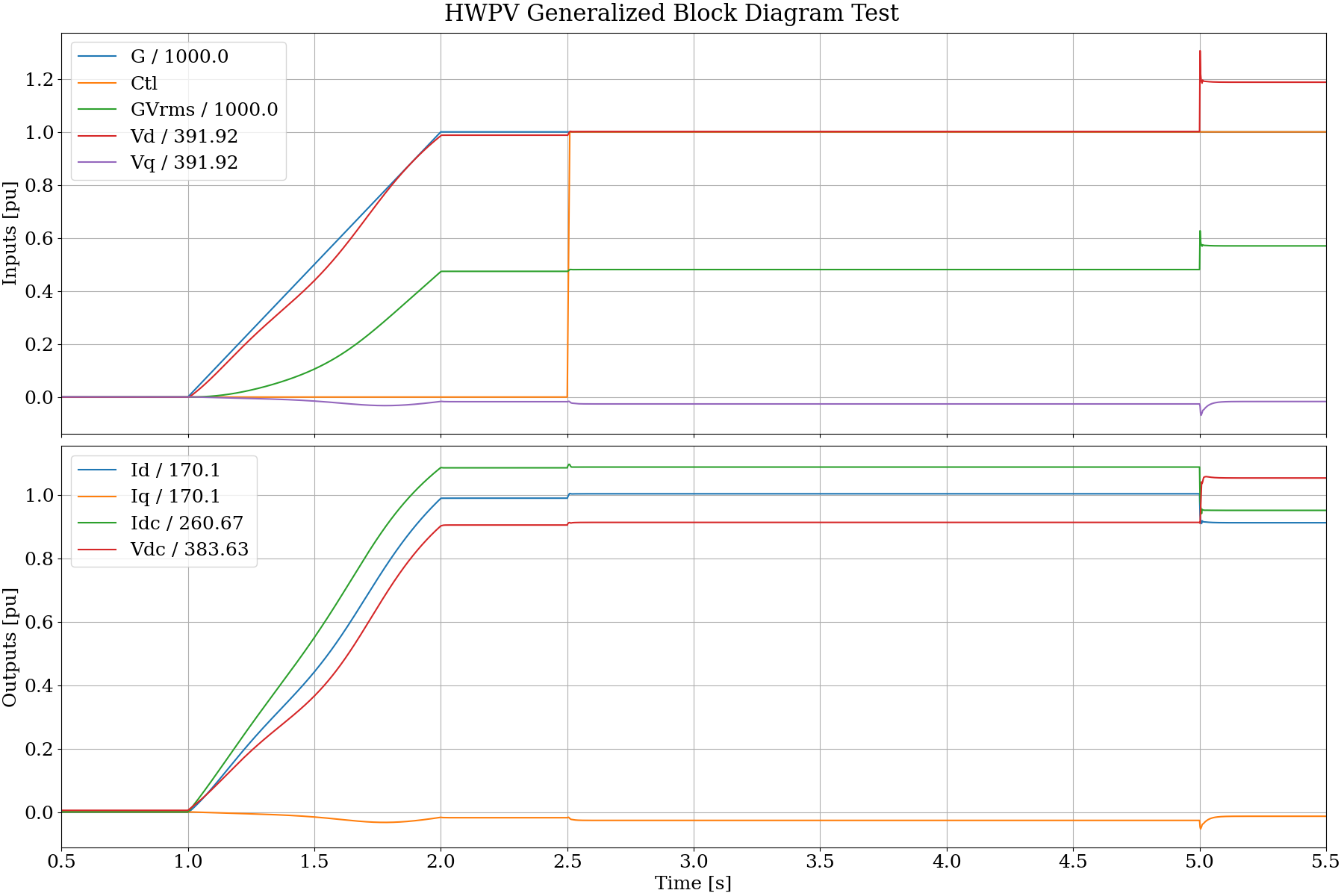
This result shows example response of the generalized block diagram model to ramp and step changes in the inputs (solar irradiance, G, AC terminal voltage, Vd and Vq, a polynomial input feature, GVrms, and an inverter mode transition flag, Ctl). The outputs Id and Iq drive a controlled Norton equivalent current source on the AC side. The outputs Idc and Vdc are estimated quantities for an external controller, i.e., they are not coupled to an electrical model on the DC side of the converter in this example.
WECC REPCA1
This directory contains an IEEE/CIGRE DLL wrapper around an FMU exported from OpenIPSL’s REPCA1 plant controller implementation [1]. Other resources [2] and [3].
Limitations:
Parameters are fixed at initialization
Snapshots and states are unsupported
Prerequisites:
Compiler and Cmake as described above
OpenModelica (Tested with version 1.26.3)
Python 3 (Tested with version 3.14.3)
Build Instructions - Windows
Follow these instructions to make 64-bit and 32-bit versions of the DLL:
Open the x64 Native Tools Command Prompt for VS 2022 from Windows Start Menu.
From the repository root:
Checkout git submodule OpenIPSL from its git repository:
git submodule update --init --recursiveRegenerate the FMU build files (default as-tested path to omc.exe is shown):
python dll\ppc\fmu\generate_fmu_build.py --omc-cmd "c:\program files\openmodelica1.26.3-64bit\bin\omc.exe"Remove build and build32 if they already exist.
md buildmd build32cmake -S dll\ppc -B build -A x64cmake -S dll\ppc -B build32 -A Win32cmake --build build --config Releaseorcmake --build build --config Debugcmake --install buildcmake --build build32 --config Releaseorcmake --build build32 --config Debugcmake --install build32
From the build and build32 directories, check the exported functions:
dumpbin /exports Release\PPC.dllordumpbin /exports Debug\PPC.dllRelease\TEST_PPC.exegenerates CSV output for the wrapper-based harnesspython ..\dll\bin\plotdlltest.py ppc_voltage_step.csvplots one of the CSV output files
From the installed output directories:
x64 installs to dllbin
Win32 installs to dllbin32
TEST_PPC.execan also be run from those installed directories
The tests write CSV outputs for the configured scenarios.
File Directory
fmu/PPC.mo: wrapper model around OpenIPSL.Electrical.Renewables.PSSE.PlantController.REPCA1
fmu/export_fmu.mos: OpenModelica FMU export script
fmu/generate_fmu_build.py: regenerates dll/ppc/CMakeLists.txt after FMU export
PPC.c: IEEE/CIGRE DLL wrapper around the exported FMU
test_ppc.c: test harness using DLLWrapper
Results
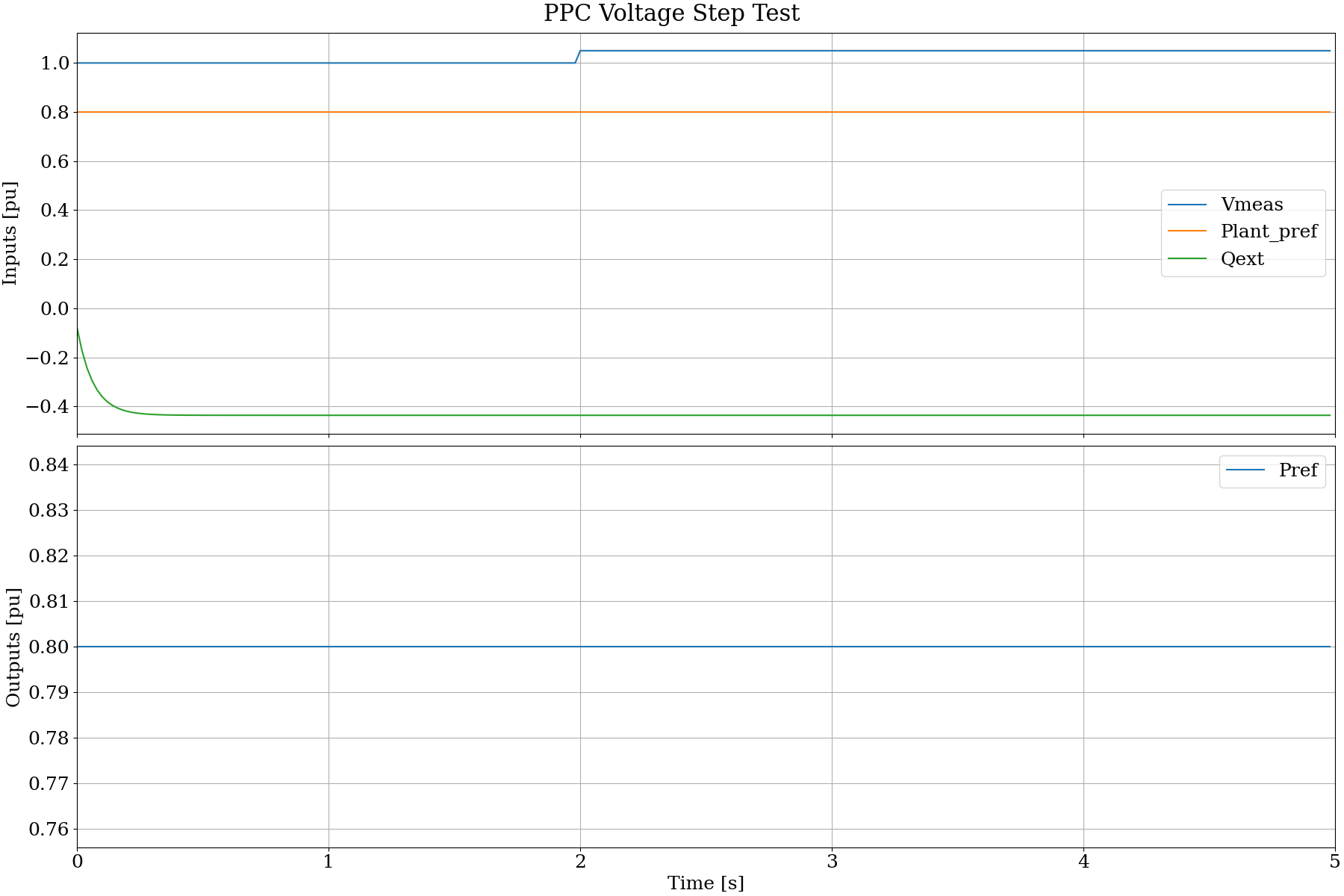
The following result shows response of the plant controller to a step increase in terminal voltage. There is no change in the plant active power reference, but the plant reactive power should decrease (absorbing) to reduce the terminal voltage.
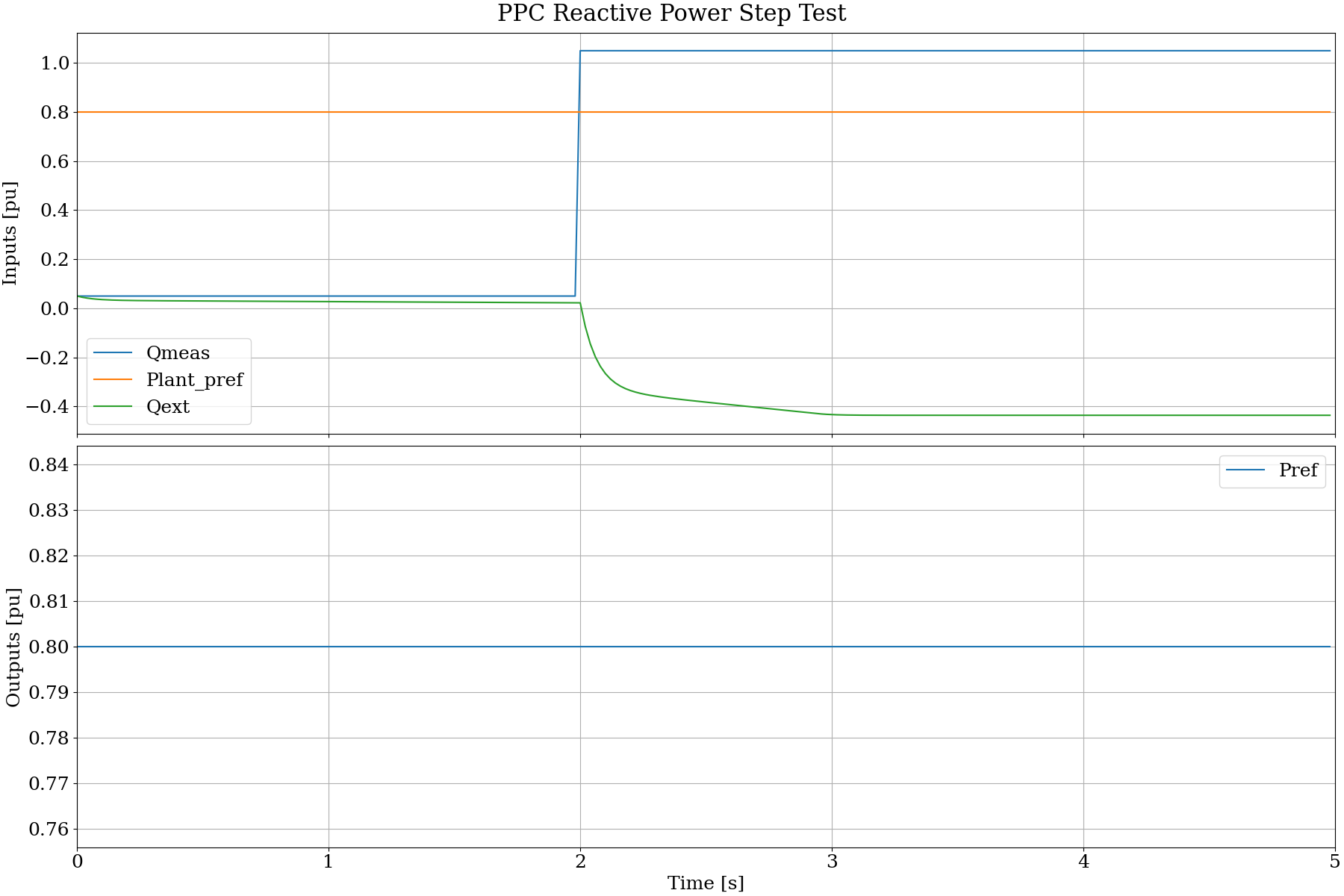
The following result shows response of the plant controller to a step reduction in the external reactive power reference. There is no effect on the plant active power reference. There is no response in measured reactive power because there is no power system connected to the controller.
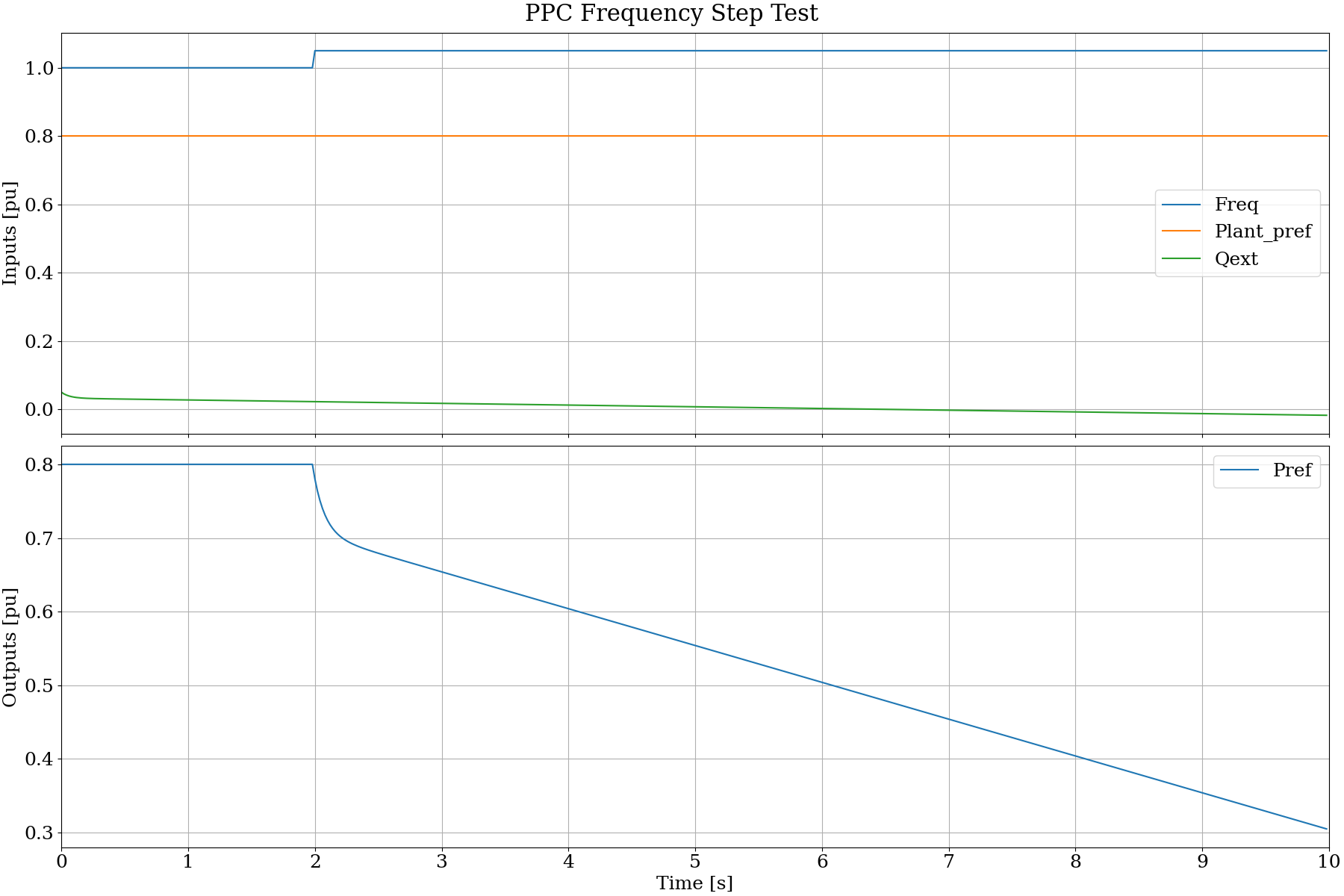
The following result shows response of the plant controller to a step increase in the measured frequency. There is no effect on the plant requested active power reference. However, the controlled Pref should decrease in response to the frequency. There is no corresponding response in system frequency becasue there is no power system connected to the controller.
Licenses
IEEE: Contributions as per IEEE Open Source Apache 2.0 CLA for P3743 WG EMTIOP
OpenIPSL: license as per open-source license in repository source (https://github.com/OpenIPSL/OpenIPSL.git):
BSD 3-Clause License
Copyright (c) 2016-2026 Luigi Vanfretti, ALSETLab (formerly SmarTS Lab) and contributors. All rights reserved.
Redistribution and use in source and binary forms, with or without modification, are permitted provided that the following conditions are met:
Redistributions of source code must retain the above copyright notice, this list of conditions and the following disclaimer.
Redistributions in binary form must reproduce the above copyright notice, this list of conditions and the following disclaimer in the documentation and/or other materials provided with the distribution.
Neither the name of the copyright holder nor the names of its contributors may be used to endorse or promote products derived from this software without specific prior written permission.
THIS SOFTWARE IS PROVIDED BY THE COPYRIGHT HOLDERS AND CONTRIBUTORS “AS IS” AND ANY EXPRESS OR IMPLIED WARRANTIES, INCLUDING, BUT NOT LIMITED TO, THE IMPLIED WARRANTIES OF MERCHANTABILITY AND FITNESS FOR A PARTICULAR PURPOSE ARE DISCLAIMED. IN NO EVENT SHALL THE COPYRIGHT HOLDER OR CONTRIBUTORS BE LIABLE FOR ANY DIRECT, INDIRECT, INCIDENTAL, SPECIAL, EXEMPLARY, OR CONSEQUENTIAL DAMAGES (INCLUDING, BUT NOT LIMITED TO, PROCUREMENT OF SUBSTITUTE GOODS OR SERVICES; LOSS OF USE, DATA, OR PROFITS; OR BUSINESS INTERRUPTION) HOWEVER CAUSED AND ON ANY THEORY OF LIABILITY, WHETHER IN CONTRACT, STRICT LIABILITY, OR TORT (INCLUDING NEGLIGENCE OR OTHERWISE) ARISING IN ANY WAY OUT OF THE USE OF THIS SOFTWARE, EVEN IF ADVISED OF THE POSSIBILITY OF SUCH DAMAGE.