Overview
EMTHub® provides software and data schemas for standards-based model building and validation to perform electromagnetic transient (EMT) studies of electric utility power systems. The focus is on inverter-based resources (IBR), e.g., wind, solar, and storage, in electric utility systems. Network EMT models are based on an extension and profile of the Common Information Model (CIM), available under the Apache 2.0 License. Unit and plant IBR models interface to a Cigre/IEEE specification on real-code modeling through dynamics link library (DLL) interfaces.
As part of IEEE P3743, Recommended Practice for Electromagnetic Transient Model Interoperability for Electric Power Transmission Systems, this content will shortly move to an IEEE open-source project called EMTIOP. The document under development by the P3743 Working Group is considered normative for the open-source software, and vice versa. For now, only members of the P3743 Working Group can access draft versions of the document at iMeet. Others may view the scope and purpose of P3743, and express interest in joining its Working Group, at the P3743 PAR Site. In the meantime, until P3743 is published, scripts and examples will run as documented here.
This content may also depend on IEEE P3597, which aims to standardize the DLL interface. P3597 begins meeting in July 2026 at the IEEE PES General Meeting in Montreal.
The IEC CIM standards are not normative for P3743. The open-source software is based on the CIM UML, under an Apache 2.0 license.
Installation - Windows
Python 3.11.4 or greater is required. If necessary, install or update Python. Then install the Python package from a Windows Command Prompt:
pip install emthub
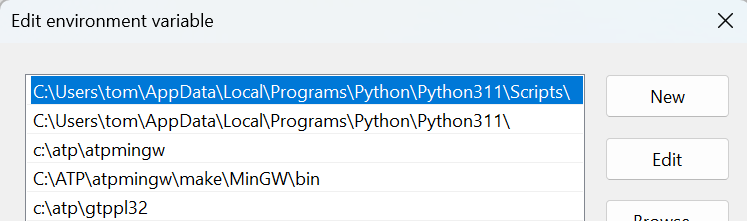
If you installed Python fresh from the Microsoft Store or the new Python
install manager, it may not have added Python console scripts to the
Windows path. You can do this in the Windows Settings app. If
emthub-list-cases fails to run in the next section, that means you
need to complete this step. The path to add will be a subfolder of your
Python installation, which should already be in the path. For example, the
path you need to add might end with
\Python\pythoncore-3.14-64\Scripts. See the screenshot below for a
highlighted example from an earlier version. It matches the core
Python path directly underneath. It also shows some paths for optional ATP
testing.
MATPOWER
MATPOWER is an open-source power flow (PF) solver used in most of the examples. It is a prerequisite that should be installed before proceeding further. If you have MATLAB, then MATPOWER can run as a MATLAB add-on. Otherwise, MATPOWER can run in the open-source Octave package.
Alternative Transients Program (ATP)
ATP is a free-to-use but not open-source EMT solver. It has restrictive license terms. Utilities, researchers, and some consultants are generally able to license ATP, but generally not EMT tool developers. The examples in this package run in ATP, so you may wish to consider obtaining an ATP license and installing it. If not, you may still create and examine ATP models from CIM using this package, which may be helpful in developing other CIM-to-EMT model conversions. Therefore, ATP is not a prerequisite for this package.
Quick Start - Windows
First, open a Windows Command Prompt and run an example. It is suggested that you create a directory for testing, e.g., emthub, and then change to this directory. The command to list the available examples is:
emthub-list-cases
which returns:
Idx Name     mRID                                 Description
  0 IEEE39   6477751A-0472-4FD6-B3C3-3AD4945CBE56 39 buses, 9 machines, 1 IBR
  1 IEEE118  1783D2A8-1204-4781-A0B4-7A73A2FA6038 193 buses, 56 machines, 19 IBR
  2 WECC240  2540AF5C-4F83-4C0F-9577-DEE8CC73BBB3 333 buses, 105 machines, 35 IBR
  3 XfmrSat  93EA6BF1-A569-4190-9590-98A62780489E 5 buses, load rejection with transformer saturation
  4 SMIBDLL  62CB0930-211D-4762-B5C1-27BF73EAC7C4 12 buses in a test harness, 1 IBR in a DLL
To extract input files for the SMIBDLL example:
emthub-extract-case 4
This copies about 20 files into your test directory, including some Python scripts and ATP support files. Included are gfm_gfl_ibr2.dll, a 64-bit example DLL, and gfm_gfl_ibr2.dll32, the same model in a 32-bit DLL. On a 64-bit Python installation, the 64-bit DLL is necessary to configure the SMIBDLL example:
python create_smib_dll.py 4
This produces CIM RDF in SMIBDLL.ttl from hard-coded rawfile information, plus calling the DLL API locally. It also produces the same CIM RDF in SMIBDLL.xml and SMIBDLL.json. Examine any of these three files to explore the CIM RDF.
To create an ATP netlist:
python cim_to_atp.py 4
This creates an ATP network model in SMIBDLL_net.atp and part of the DLL interface in DLL1.mod. Even if you don’t have ATP installed, it may be profitable to explore the content of these files.
Optional - DLLs in ATP
To run SMIBDLL in ATP, which is a 32-bit solver, you should copy gfm_gfl_ibr2.dll32 into an ATP bin directory. See ATP DLL Readme for more information. This involves linking the DLL call as described here. If these steps have been done, then the examples can be run in ATP. To run SMIBDLL:
python atp.py 4 run
To convert the output from PL4 to COMTRADE and then HDF5:
python atp.py 4 convert
To then plot the results:
python atp.py 4 plot
Next Steps
Next, choose one of the roadmaps to follow:
Users to just run all the examples.
Profile Maintainers for maintaining the CIM extensions and profile.
Network Model Developers for developing and testing CIM data import to EMT tools.
Dynamics Model Maintainers for adding or maintaining more standardized controller models that are read from text files.
DLL Developers for developing and testing DLL models.
Consult the Bibliography as needed for background information.
Linux and Mac OS
The functions generally work as they do on Windows, except:
Use
python3andpip3instead ofpythonandpip, respectively.The DLLs don’t work on Linux or Mac OS. If you want the appropriate so or dylib versions, please post an issue on GitHub and we will consider it.
The execution of ATP is not supported. You can still generate ATP netlists.
A sample script file to run the test cases is:
#!/bin/bash
for i in {0..3}
do
    emthub-extract-case $i
    python3 raw_to_rdf.py $i
    python3 bps_make_mpow.py $i
    python3 mpow.py $i
    python3 ic_to_rdf.py $i
    python3 cim_to_atp.py $i
done
emthub-extract-case 4
# the next two steps produce incorrect results because the example DLL cannot be invoked on Linux or Mac OS
python3 create_smib_dll.py 4
python3 cim_to_atp.py 4
python3 cim_summary.py
The last command summarizes CIM class counts in each example.
Repository
See EMTHub directory. This content is moving to an IEEE Open-source Project but that migration is under IEEE compliance review, and is not yet public.
To make a local copy, first Install Git. Then invoke this command from a directory where source code will be kept, such as c:src:
git clone https://github.com/temcdrm/emthub.git